Error handling: Motor power OFF;
Error reset: Possible*1
Description: An abnormal pattern was detected in the encoder incremental pulse output signal. (This corresponds to the INC error code from the encoder.)
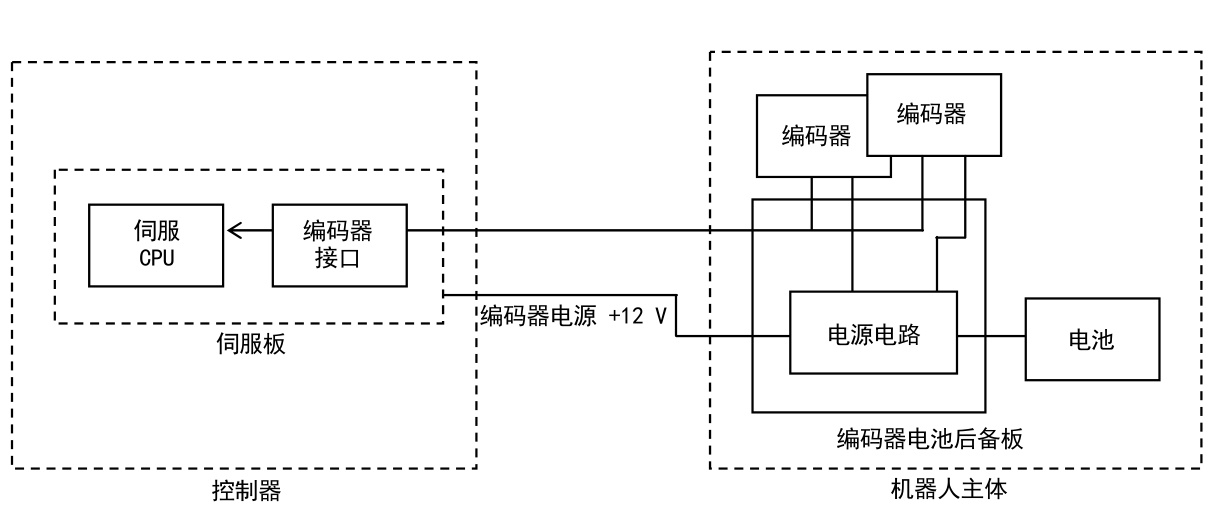
Encoder
Encoder
Servo
Encoder
CPU
Interface
Encoder power supply +12 V
Power supply circuit
Battery
Servo board
Encoder battery backup board
Robot main body
Controller
Main causes:
-
Effects of noise. (Noise is more likely if the error occurs while the robot servo is active.)
-
A problem with the encoder.
-
A problem with the servo board.
Countermeasures:
-
Check the encoder's noise resistance (cable shielding).
-
Replace the encoder*2.
-
Replace the servo board.
CAUTION
After resetting this error, carefully operate the robot at low speed in teach mode and confirm that the same error does not recur.
*1 Clear the error using the following procedure.
- Robot operation (when the posture must be changed). If the robot posture must be changed while the error is present, operate using either method (a) or (b) below.
(a) Manually release the axis brake and move the arm.
(b) Disconnect the axis on which the error occurred, then reset the error and operate.
(1) Execute the following AS language command from the teach pendant keyboard screen or terminal software to disconnect the axis with the error.
JTDISCONNECT robot number: axis number. (Example) JTDISCONNECT 1:2 disconnects axis 2 of robot 1.
(2) Reset the error.
(3) Operate the robot using individual axis motion in teach mode. Operation in other modes is not possible because the following error occurs.
(E1540) Axis disconnected; each axis can move in teach mode only.
- Eliminate the cause of the error: Eliminate the cause of the error in accordance with "Corrective Action".

CAUTION
Be sure to eliminate the cause of the error before proceeding with the following steps.
- Clearing the error.
(1) If the axis is disconnected, reconnect it using the following AS language command. JTCONNECT robot number: axis number. (Example) JTCONNECT 1: 2 reconnects axis 2 of robot 1. After reconnecting the axis with the error, the error is displayed again and returns to the state in which it cannot be reset.
(2) The error can be cleared using auxiliary function "822 Clear encoder abnormality latch" or by executing an AS language command.
-
In auxiliary function "822 Clear encoder abnormality latch", enter the axis number for which the error is to be cleared and perform the clearing operation. A pop-up window then appears; select "Yes" to clear it.
-
AS language command: Execute the following AS language command from the teach pendant keyboard screen or terminal software to clear the axis error. ENC_ERR_LATCH_CLR robot number: axis number. (Example) ENC_ERR_LATCH_CLR 1:2 clears the error for axis 2 of robot 1. When the dialog appears, select "Yes" to clear the error.
(3) Reset the error.
*2 Refer to the appendix “List of Models and Axes for Which the Encoder Can Be Replaced Separately”. If the model and axis allow separate encoder replacement, replace the encoder alone; otherwise, replace the entire motor.