Error handling: Motor power OFF.
Error reset: Possible.
Description: The axis limit switch is activated even though the robot has not exceeded its motion range (restricted space).
The motion range of each axis can be set in auxiliary function 0507. It is normally set to the robot's maximum motion range at shipment.
Consider the following conditions when changing the motion range settings:
Set motion range Operable range > Mechanical stop > > Axis limit switch (restricted space)
Mechanical stops and axis limit switches are optional, and the axes on which they are installed vary with the robot type and configuration. Typically, the AS software limits robot motion to prevent it from exceeding the set working range.
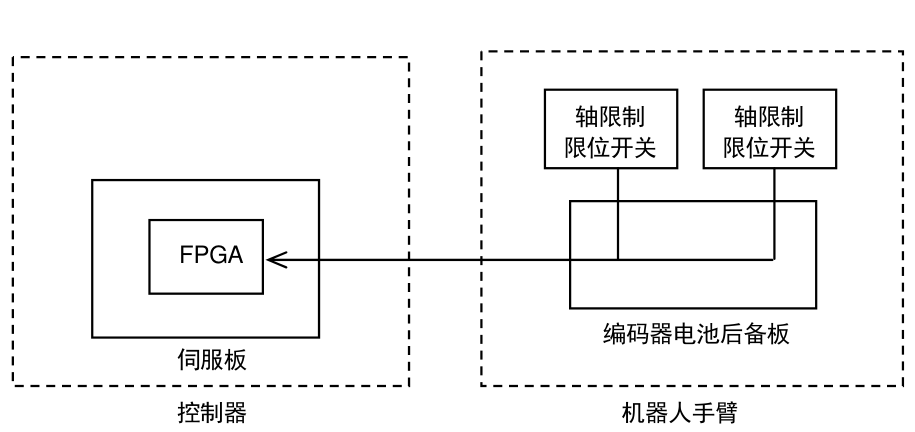
Axis limit
Axis limit
Limit switch
Limit switch
FPGA
Encoder battery backup board
Servo board
Controller
Robot arm
Main causes:
-
The axis restriction limit switch is positioned within the set motion range, and the axis restriction limit switch has been activated.
-
Incorrect zeroing data or abnormal robot motion activates the axis limit switch.
-
An open circuit in the axis limit switch harness.
-
The axis restriction limit switch is faulty.
-
A problem with the servo board.
Countermeasures:
-
When this failure occurs, motor power can be forcibly switched on by holding down the bypass switch on the power sequence board. Then return the arm to within the motion range in teach mode.
-
Alternatively, if the power cannot be turned ON, use the manual brake release switch (option) to release the brakes manually and move the arm into the motion range. At this time, be sure to turn the motor power OFF and release all emergency stop buttons.
-
Set an appropriate motion range value.
-
Adjust the axis limit switch position appropriately.
-
Check the harness and axis limit switches, and replace them if necessary.
-
Replace the servo board.
Reference: Select <Display 1> → → <Safety Circuit Monitor 2> on the teach pendant screen to check the safety circuit status. For details of safety circuit input monitoring, refer to the Operation Manual.